Cloud Power-Up: Building a Scalable Forecast Engine on AWS
In our last article, we faced a hard truth: our local forecasting system hits a wall at scale. Processing 10,000 products would take 3.5 days on a laptop—completely unacceptable for business operations.
Today, we break through that wall. We’re taking our beautifully structured local code and transforming it into a cloud-native, massively parallel forecasting engine on AWS. The same workload that took days will now take minutes.
The Cloud-Native Mindset
Before we dive into code, let’s understand the architectural shift:
| Local Pattern | Cloud Pattern |
|---|---|
| Sequential processing | Parallel execution |
| File system storage | S3 as single source of truth |
| Manual orchestration | Automated workflows |
| One-size-fits-all compute | Right-sized resources per task |
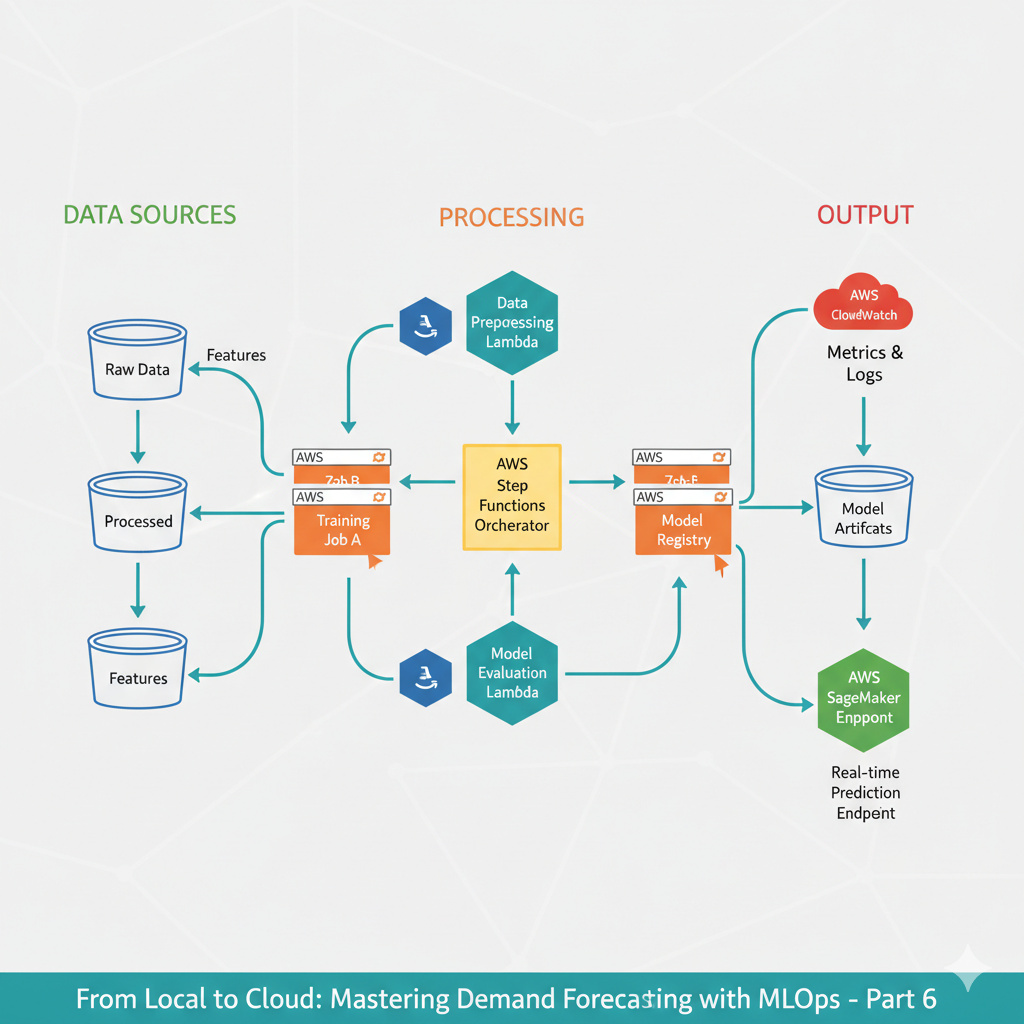
Our Target Architecture
Here’s what we’re building:
[ S3 Raw Data ] → [ Lambda Trigger ] → [ Step Functions ]
        ↓
[ Feature Engineering ] → [ Parallel Training ] → [ Model Registry ]
        ↓
[ Real-time Inference ] ← [ Model Endpoint ] ← [ Batch Predictions ]
Step 1: Data Foundation - S3 as Single Source of Truth
First, let’s migrate our data to S3 and make our code cloud-aware:
# src/cloud/s3_data_manager.py
import boto3
import pandas as pd
import io
from pathlib import Path
import json

class S3DataManager:
    """Manage data storage and retrieval from S3"""

    def __init__(self, bucket_name: str, prefix: str = "demand-forecast"):
        self.s3 = boto3.client('s3')
        self.bucket = bucket_name
        self.prefix = prefix

    def upload_dataframe(self, df: pd.DataFrame, s3_key: str):
        """Upload DataFrame to S3 as Parquet"""
        buffer = io.BytesIO()
        df.to_parquet(buffer, index=False)
        buffer.seek(0)

        full_key = f"{self.prefix}/{s3_key}"
        self.s3.upload_fileobj(buffer, self.bucket, full_key)
        print(f"Uploaded {len(df)} rows to s3://{self.bucket}/{full_key}")

    def download_dataframe(self, s3_key: str) -> pd.DataFrame:
        """Download DataFrame from S3 Parquet file"""
        full_key = f"{self.prefix}/{s3_key}"
        response = self.s3.get_object(Bucket=self.bucket, Key=full_key)
        return pd.read_parquet(io.BytesIO(response['Body'].read()))

    def list_products(self) -> list:
        """List all available products in S3"""
        response = self.s3.list_objects_v2(
            Bucket=self.bucket,
            Prefix=f"{self.prefix}/raw/"
        )

        products = []
        for obj in response.get('Contents', []):
            if obj['Key'].endswith('.parquet'):
                product_id = Path(obj['Key']).stem
                products.append(product_id)

        return products

# Updated data loading that works with S3
def load_data_cloud(product_id: str, s3_manager: S3DataManager) -> pd.DataFrame:
    """Load data from S3 instead of local files"""
    try:
        s3_key = f"processed/{product_id}.parquet"
        return s3_manager.download_dataframe(s3_key)
    except Exception as e:
        print(f"Error loading {product_id}: {e}")
        # Fallback: generate sample data
        from src.data.make_dataset import generate_retail_demand_data
        df = generate_retail_demand_data()
        product_data = df[df['product_id'] == product_id]
        s3_manager.upload_dataframe(product_data, f"raw/{product_id}.parquet")
        return product_data
Step 2: Parallel Training with SageMaker
The key to scaling: train all products simultaneously. Here’s how we adapt our training script for SageMaker:
# scripts/sagemaker_training.py
import argparse
import json
import pandas as pd
from src.features.build_features import build_features
from src.models.train import prepare_training_data, train_model
import os
import joblib

def train_sagemaker():
    """Training script adapted for SageMaker environment"""

    # SageMaker passes paths via environment variables
    input_path = os.environ.get('SM_CHANNEL_TRAINING', '/opt/ml/input/data/training')
    model_path = os.environ.get('SM_MODEL_DIR', '/opt/ml/model')

    # Parse arguments
    parser = argparse.ArgumentParser()
    parser.add_argument('--product-id', type=str, required=True)
    parser.add_argument('--config-path', type=str, default='/opt/ml/input/config')
    args = parser.parse_args()

    print(f"Training model for product: {args.product_id}")
    print(f"Input path: {input_path}, Model path: {model_path}")

    try:
        # Load data (in real scenario, this comes from S3 via SageMaker channel)
        data_file = f"{input_path}/{args.product_id}.parquet"
        df = pd.read_parquet(data_file)

        # Build features and train model (using our existing functions!)
        df_features = build_features(args.product_id, df=df)
        model, feature_columns, metrics = train_model(
            args.product_id,
            save_model=False,
            df_features=df_features
        )

        # Save model in SageMaker format
        model_file = f"{model_path}/model.joblib"
        joblib.dump(model, model_file)

        # Save feature information
        metadata = {
            'product_id': args.product_id,
            'feature_columns': feature_columns,
            'metrics': metrics,
            'feature_importance': dict(zip(feature_columns, model.feature_importances_))
        }

        with open(f"{model_path}/metadata.json", 'w') as f:
            json.dump(metadata, f, indent=2)

        print(f"Training completed for {args.product_id}")
        print(f"Metrics: {metrics}")

    except Exception as e:
        print(f"Error training model for {args.product_id}: {str(e)}")
        raise

if __name__ == "__main__":
    train_sagemaker()
Step 3: Orchestration with Step Functions
Now, let’s orchestrate parallel training across all products:
# scripts/stepfunction_orchestrator.py
import boto3
import json
from typing import List

class TrainingOrchestrator:
    """Orchestrate parallel model training across all products"""

    def __init__(self, s3_bucket: str, role_arn: str):
        self.sfn = boto3.client('stepfunctions')
        self.sagemaker = boto3.client('sagemaker')
        self.s3_bucket = s3_bucket
        self.role_arn = role_arn

    def create_training_state_machine(self) -> str:
        """Create Step Function state machine for parallel training"""

        state_machine_definition = {
            "Comment": "Parallel Product Training Pipeline",
            "StartAt": "GetProductList",
            "States": {
                "GetProductList": {
                    "Type": "Task",
                    "Resource": "arn:aws:states:::lambda:invoke",
                    "Parameters": {
                        "FunctionName": "get-products-function",
                        "Payload": {
                            "bucket": self.s3_bucket
                        }
                    },
                    "ResultPath": "$.products",
                    "Next": "MapProducts"
                },
                "MapProducts": {
                    "Type": "Map",
                    "ItemsPath": "$.products",
                    "MaxConcurrency": 50,  # Process 50 products in parallel
                    "Iterator": {
                        "StartAt": "TrainProductModel",
                        "States": {
                            "TrainProductModel": {
                                "Type": "Task",
                                "Resource": "arn:aws:states:::sagemaker:createTrainingJob.sync",
                                "Parameters": {
                                    "TrainingJobName.$": "States.Format('training-{}-{}', $$.Execution.Name, $.product_id')",
                                    "RoleArn": self.role_arn,
                                    "AlgorithmSpecification": {
                                        "TrainingImage": "your-training-image-uri",  # Your custom container
                                        "TrainingInputMode": "File"
                                    },
                                    "InputDataConfig": [
                                        {
                                            "ChannelName": "training",
                                            "DataSource": {
                                                "S3DataSource": {
                                                    "S3DataType": "S3Prefix",
                                                    "S3Uri.$": f"s3://{self.s3_bucket}/demand-forecast/processed/",
                                                    "S3DataDistributionType": "FullyReplicated"
                                                }
                                            }
                                        }
                                    ],
                                    "OutputDataConfig": {
                                        "S3OutputPath": f"s3://{self.s3_bucket}/demand-forecast/models/"
                                    },
                                    "ResourceConfig": {
                                        "InstanceType": "ml.m5.large",
                                        "InstanceCount": 1,
                                        "VolumeSizeInGB": 30
                                    },
                                    "StoppingCondition": {
                                        "MaxRuntimeInSeconds": 3600
                                    },
                                    "HyperParameters": {
                                        "product-id.$": "$.product_id"
                                    }
                                },
                                "End": True
                            }
                        }
                    },
                    "Next": "TrainingComplete"
                },
                "TrainingComplete": {
                    "Type": "Pass",
                    "Result": "All training jobs completed",
                    "End": True
                }
            }
        }

        response = self.sfn.create_state_machine(
            name='ProductTrainingPipeline',
            definition=json.dumps(state_machine_definition),
            roleArn=self.role_arn
        )

        return response['stateMachineArn']

    def start_training_pipeline(self, product_ids: List[str] = None):
        """Start the parallel training pipeline"""

        if product_ids is None:
            # Get all products from S3
            s3_manager = S3DataManager(self.s3_bucket)
            product_ids = s3_manager.list_products()

        execution_input = {
            "products": [{"product_id": pid} for pid in product_ids[:100]]  # Limit for demo
        }

        response = self.sfn.start_execution(
            stateMachineArn=self.state_machine_arn,
            name=f"TrainingExecution-{pd.Timestamp.now().strftime('%Y%m%d-%H%M%S')}",
            input=json.dumps(execution_input)
        )

        return response['executionArn']
Step 4: Serverless Feature Engineering with Lambda
Let’s make feature engineering scalable and event-driven:
# scripts/lambda_feature_engineering.py
import json
import boto3
import pandas as pd
from src.features.build_features import build_features
from src.data.preprocessing import preprocess_data

s3 = boto3.client('s3')

def lambda_handler(event, context):
    """Lambda function for feature engineering"""

    bucket = event['Records'][0]['s3']['bucket']['name']
    key = event['Records'][0]['s3']['object']['key']

    # Only process raw data files
    if not key.startswith('demand-forecast/raw/'):
        return {'status': 'skipped', 'reason': 'Not a raw data file'}

    try:
        # Extract product ID from file name
        product_id = key.split('/')[-1].replace('.parquet', '')

        print(f"Processing features for {product_id}")

        # Download raw data
        response = s3.get_object(Bucket=bucket, Key=key)
        raw_df = pd.read_parquet(io.BytesIO(response['Body'].read()))

        # Preprocess data (using our existing function!)
        processed_df = preprocess_data(raw_df)

        # Build features (using our existing function!)
        features_df = build_features(product_id, df=processed_df)

        # Upload processed features to S3
        output_key = f"demand-forecast/processed/{product_id}.parquet"
        buffer = io.BytesIO()
        features_df.to_parquet(buffer, index=False)
        buffer.seek(0)

        s3.upload_fileobj(buffer, bucket, output_key)

        print(f"Completed feature engineering for {product_id}")

        return {
            'statusCode': 200,
            'body': json.dumps({
                'status': 'success',
                'product_id': product_id,
                'processed_rows': len(features_df)
            })
        }

    except Exception as e:
        print(f"Error processing {key}: {str(e)}")
        return {
            'statusCode': 500,
            'body': json.dumps({
                'status': 'error',
                'error': str(e)
            })
        }
Step 5: Deployment Script
Let’s tie everything together with a deployment script:
# scripts/deploy_cloud.py
import boto3
import time
from pathlib import Path

def deploy_cloud_infrastructure():
    """Deploy complete cloud forecasting infrastructure"""

    # Configuration
    config = {
        'bucket_name': 'your-demand-forecast-bucket',
        'region': 'us-east-1',
        'role_arn': 'your-sagemaker-execution-role'
    }

    print("🚀 Deploying Cloud Forecasting Infrastructure...")

    # 1. Create S3 bucket
    s3 = boto3.client('s3', region_name=config['region'])
    try:
        s3.create_bucket(
            Bucket=config['bucket_name'],
            CreateBucketConfiguration={'LocationConstraint': config['region']}
        )
        print("✅ S3 bucket created")
    except s3.exceptions.BucketAlreadyExists:
        print("✅ S3 bucket already exists")

    # 2. Upload initial data
    s3_manager = S3DataManager(config['bucket_name'])
    from src.data.make_dataset import generate_retail_demand_data
    df = generate_retail_demand_data()

    # Upload sample products
    sample_products = ['P001', 'P002', 'P003']
    for product_id in sample_products:
        product_data = df[df['product_id'] == product_id]
        s3_manager.upload_dataframe(product_data, f"raw/{product_id}.parquet")

    print("✅ Sample data uploaded")

    # 3. Create Step Functions orchestration
    orchestrator = TrainingOrchestrator(config['bucket_name'], config['role_arn'])
    state_machine_arn = orchestrator.create_training_state_machine()
    print("✅ Step Functions state machine created")

    # 4. Test the pipeline
    print("🧪 Testing pipeline with sample products...")
    execution_arn = orchestrator.start_training_pipeline(sample_products)
    print(f"✅ Pipeline started: {execution_arn}")

    return {
        'bucket_name': config['bucket_name'],
        'state_machine_arn': state_machine_arn,
        'execution_arn': execution_arn
    }

if __name__ == "__main__":
    results = deploy_cloud_infrastructure()
    print("\n🎉 Deployment Complete!")
    print(f"S3 Bucket: {results['bucket_name']}")
    print(f"State Machine: {results['state_machine_arn']}")
    print(f"Execution: {results['execution_arn']}")
The Business Impact
This transformation isn’t just technical—it creates real business value:
- Speed: Forecast updates in minutes instead of days
- Scale: Handle business growth without re-architecting
- Reliability: Automated, monitored pipelines
- Cost: Pay only for what you use
- Innovation: Faster experimentation with new models
The Best Part: We Kept Our Code
Notice something important? We’re still using our well-tested local functions:
build_features()preprocess_data()train_model()
The cloud transformation happened around our existing logic, not by rewriting it. This is the power of good MLOps foundations.
What’s Next
We’ve solved the scaling problem, but we’re not done. In our final article, we’ll cover:
- Real-time inference endpoints
- Model monitoring and drift detection
- Cost optimization strategies
- CI/CD for ML pipelines
From Local Prison to Cloud Freedom
We’ve transformed our forecasting system from a local bottleneck into a cloud-powered competitive advantage. The same code that struggled with 10 products now effortlessly handles 10,000.
The wall we hit wasn’t a dead end—it was a doorway to scale.